Selex LEMO to Peltor adapter: Difference between revisions

From Pessin randon wiki
No edit summary
 
(9 intermediate revisions by the same user not shown)
Line 1: Line 1:
Tällä sivulla on karkea johdotus ja osalista adapteriin
=== Parts ===
 
Varaosat
 
* LEMO FGG.1B.305.CLAD62
* NEXUS TJ-101
* NEXUS TJ-101
Line 13: Line 10:
** White Mic-/GND
** White Mic-/GND


=== Selex PRR lemo to Peltor J11 ===
=== Selex PRR LEMO to Peltor J11 ===
[[File:Lemo-pinout.png|alt=Lemo Pinout|Lemo pinout.The connections given are defined as 'when looking into the sockets'.[https://www.cryptomuseum.com/radio/selex/prr/index.htm <nowiki>[1]</nowiki>]|thumb]]
[[File:Lemo-pinout.png|alt=Lemo Pinout|Lemo pinout.The connections given are defined as 'when looking into the sockets'.[https://www.cryptomuseum.com/radio/selex/prr/index.htm <nowiki>[1]</nowiki>]|thumb]]


Line 23: Line 20:
# GND / Brown (blue) (sprk)
# GND / White (mic)
# GND / White (mic)
<nowiki>*</nowiki>Numbering clockwise from the back of the connector[[File:TJ-101.png|thumb|JT-101 techincal documentation [https://eu.mouser.com/datasheet/3/59/2/tj_101.pdf <nowiki>[2]</nowiki>]]]


==== NEXUS TJ-101 ====
[[File:Peltor-J11-4pin.png|thumb|Peltor J11 wiring diagram [https://airsoftnorge.com/Peltor-J11-4pin/ <nowiki>[2]</nowiki>]]]
===== Civil / Peltor wiring =====
 
# Microphone GND / White
# Microphone + / Green
# Speaker + / Yellow
# Speaker GND / Brown (blue)
 
===== Nato wiring =====
 
# Microphone GND / White
# Speaker + / Yellow
# Microphone + / Green
# Speaker GND / Brown (blue)
 
=== Suitable microphones ===


===== Civil / Peltor connection style =====
===== Electric microphones works without additional components. =====
Peltor MT53 series works without additional components.


* A/1) Speaker GND / Brown (blue)
===== Dynamic microphones needs additional components =====
* B/2) Speaker + / Yellow
Tested with Peltor MT7 microphone which needs the adapter circuit.
* C/3) Microphone + / Green
* D/4) Microphone GND / White


===== Nato =====
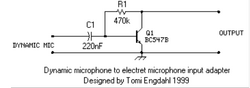
You must use a dynamic-to-electret microphone adapter circuit with a dynamic microphone. A quick Google search reveals that the Peltor MT7, MT73, and MT14 microphones require an adapter board. The Peltor MT53 is an electret microphone by default, so it won't need the adapter circuit.


* A/1) Speaker GND / Brown (blue)
* [[File:Dyn-to-elec-converter-circuit.png|thumb|Dynamic microphone to electret microphone input circuit [https://www.transkommunikation.ch/dateien/schaltungen/diverse_schaltungen/audio_circuits/Dynamic%20microphone%20to%20electret%20microphone%20input.pdf <nowiki>[3]</nowiki>]]]'''Partlist'''
* B/2) Microphone + / Green
** R1 100 kΩ Resistor / 200-500 kΩ trimmeripotentiometri
* C/3) Speaker + / Yellow
** C1 10µF Capasitator / MLCC size 0805 or 1206
* D/4) Microphone GND / White
** Q1 BC547B Transistor / SOT-23 SMD


=== References ===
=== References ===


# [https://www.cryptomuseum.com/radio/selex/prr/index.htm <nowiki>[1] https://www.cryptomuseum.com/radio/selex/prr/index.htm</nowiki>]
# [2] https://airsoftnorge.com/Peltor-J11-4pin/
# [https://eu.mouser.com/datasheet/3/59/2/tj_101.pdf <nowiki>[2] https://eu.mouser.com/datasheet/3/59/2/tj_101.pdf</nowiki>]
# [https://www.transkommunikation.ch/dateien/schaltungen/diverse_schaltungen/audio_circuits/Dynamic%20microphone%20to%20electret%20microphone%20input.pdf <nowiki>[3] https://www.transkommunikation.ch/dateien/schaltungen/diverse_schaltungen/audio_circuits/Dynamic%20microphone%20to%20electret%20microphone%20input.pdf</nowiki>]

Latest revision as of 19:07, 29 April 2026

Parts

Selex PRR LEMO to Peltor J11

Lemo Pinout
Lemo pinout.The connections given are defined as 'when looking into the sockets'.[1]

LEMO

  1. Microphone+ / Green
  2. N/A
  3. Speaker + / Yellow
  4. GND / Brown (blue) (sprk)
  5. GND / White (mic)

*Numbering clockwise from the back of the connector

JT-101 techincal documentation [2]

NEXUS TJ-101

Civil / Peltor wiring
  1. Microphone GND / White
  2. Microphone + / Green
  3. Speaker + / Yellow
  4. Speaker GND / Brown (blue)
Nato wiring
  1. Microphone GND / White
  2. Speaker + / Yellow
  3. Microphone + / Green
  4. Speaker GND / Brown (blue)

Suitable microphones

Electric microphones works without additional components.

Peltor MT53 series works without additional components.

Dynamic microphones needs additional components

Tested with Peltor MT7 microphone which needs the adapter circuit.

You must use a dynamic-to-electret microphone adapter circuit with a dynamic microphone. A quick Google search reveals that the Peltor MT7, MT73, and MT14 microphones require an adapter board. The Peltor MT53 is an electret microphone by default, so it won't need the adapter circuit.

  • Dynamic microphone to electret microphone input circuit [3]
    Partlist
    • R1 100 kΩ Resistor / 200-500 kΩ trimmeripotentiometri
    • C1 10µF Capasitator / MLCC size 0805 or 1206
    • Q1 BC547B Transistor / SOT-23 SMD

References

  1. [1] https://www.cryptomuseum.com/radio/selex/prr/index.htm
  2. [2] https://eu.mouser.com/datasheet/3/59/2/tj_101.pdf
  3. [3] https://www.transkommunikation.ch/dateien/schaltungen/diverse_schaltungen/audio_circuits/Dynamic%20microphone%20to%20electret%20microphone%20input.pdf