[[File:Lemo-pinout.png|alt=Lemo Pinout|Lemo pinout.The connections given are defined as 'when looking into the sockets'.[https://www.cryptomuseum.com/radio/selex/prr/index.htm <nowiki>[1]</nowiki>]|thumb]]
==== LEMO ====
==== LEMO ====
Line 22:
Line 20:
# GND / Brown (blue) (sprk)
# GND / Brown (blue) (sprk)
# GND / White (mic)
# GND / White (mic)
<nowiki>*</nowiki>Numbering clockwise from the back of the connector[[File:TJ-101.png|thumb|JT-101 techincal documentation [https://eu.mouser.com/datasheet/3/59/2/tj_101.pdf <nowiki>[2]</nowiki>]]]
Tested with Peltor MT7 microphone which needs the adapter circuit.
===== Civil / Peltor connection style =====
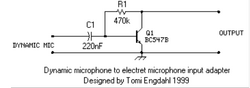
You must use a dynamic-to-electret microphone adapter circuit with a dynamic microphone. A quick Google search reveals that the Peltor MT7, MT73, and MT14 microphones require an adapter board. The Peltor MT53 is an electret microphone by default, so it won't need the adapter circuit.
* A/1) Speaker GND / Brown (blue)
* [[File:Dyn-to-elec-converter-circuit.png|thumb|Dynamic microphone to electret microphone input circuit [https://www.transkommunikation.ch/dateien/schaltungen/diverse_schaltungen/audio_circuits/Dynamic%20microphone%20to%20electret%20microphone%20input.pdf <nowiki>[3]</nowiki>]]]'''Partlist'''
Electric microphones works without additional components.
Peltor MT53 series works without additional components.
Dynamic microphones needs additional components
Tested with Peltor MT7 microphone which needs the adapter circuit.
You must use a dynamic-to-electret microphone adapter circuit with a dynamic microphone. A quick Google search reveals that the Peltor MT7, MT73, and MT14 microphones require an adapter board. The Peltor MT53 is an electret microphone by default, so it won't need the adapter circuit.
Dynamic microphone to electret microphone input circuit [3]Partlist